
Every software team dreams of 100% test coverage, and for most of them it stays a dream. Test coverage has always been expensive to build and even more expensive to maintain. Once the first batch is written, the tests start drifting out of sync with the product. Fixing them becomes a chore nobody owns, and slowly the suite stops reflecting reality.
Klarent already took a large bite out of that cost. A user describes a flow in plain English, and an agent works out the clicks. A test case becomes an instruction instead of code, and it adapts to UI changes, which cuts the maintenance tax steeply.
Klarent CLI takes the next step by putting that platform inside your coding agent, like Claude Code or Codex. Because it now lives where your docs and tickets already are, it can pull in the context that decides what is actually worth testing, and that context helps it build tests faster. Put simply, you get a large, meaningful test suite for a fraction of the effort it used to take.
Setup is one skill file away
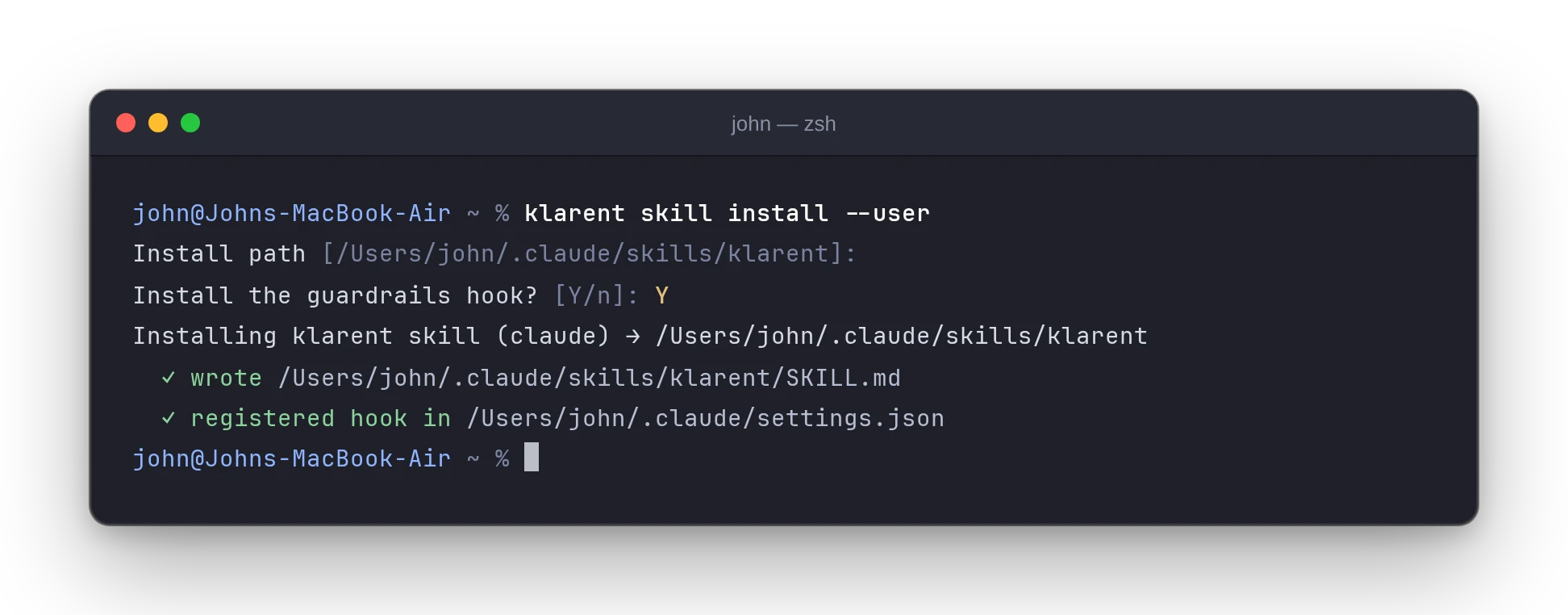
Add a skill file and your agent knows how to talk to Klarent. Type the following in your terminal:
klarent loginklarent skill installThat is it. From here on you talk to your agent in English, and it talks to Klarent.
What living in the agent unlocks
Everything below comes from one fact: the CLI runs where your context lives. You stay in control of that context. Your agent works only with the sources you point it at and give it permission to use, so you decide how much it sees.
- Share your documents, and it learns your flows. PRDs, specs, onboarding guides, support threads, and churn interviews describe your product as flows, not as a pile of pages. That is something your code alone does not tell you.
- Point it at your repo, and it gets the details right. This fills in what those documents might skip, like exact button labels, validation messages, and error states.
- Let it see your diff, and tests keep up with changes. It can check what changed on this branch right now, before you open the PR. That is the one moment when updating a test costs almost nothing, and the cost only grows as changes pile up.
- Connect the tools you choose, and they work together. Tools you already use, like GitHub, Jira, and Sentry, can work alongside it once you allow them. A Jira ticket or a Sentry error can become a test case without anyone building a separate ticket-to-test feature.
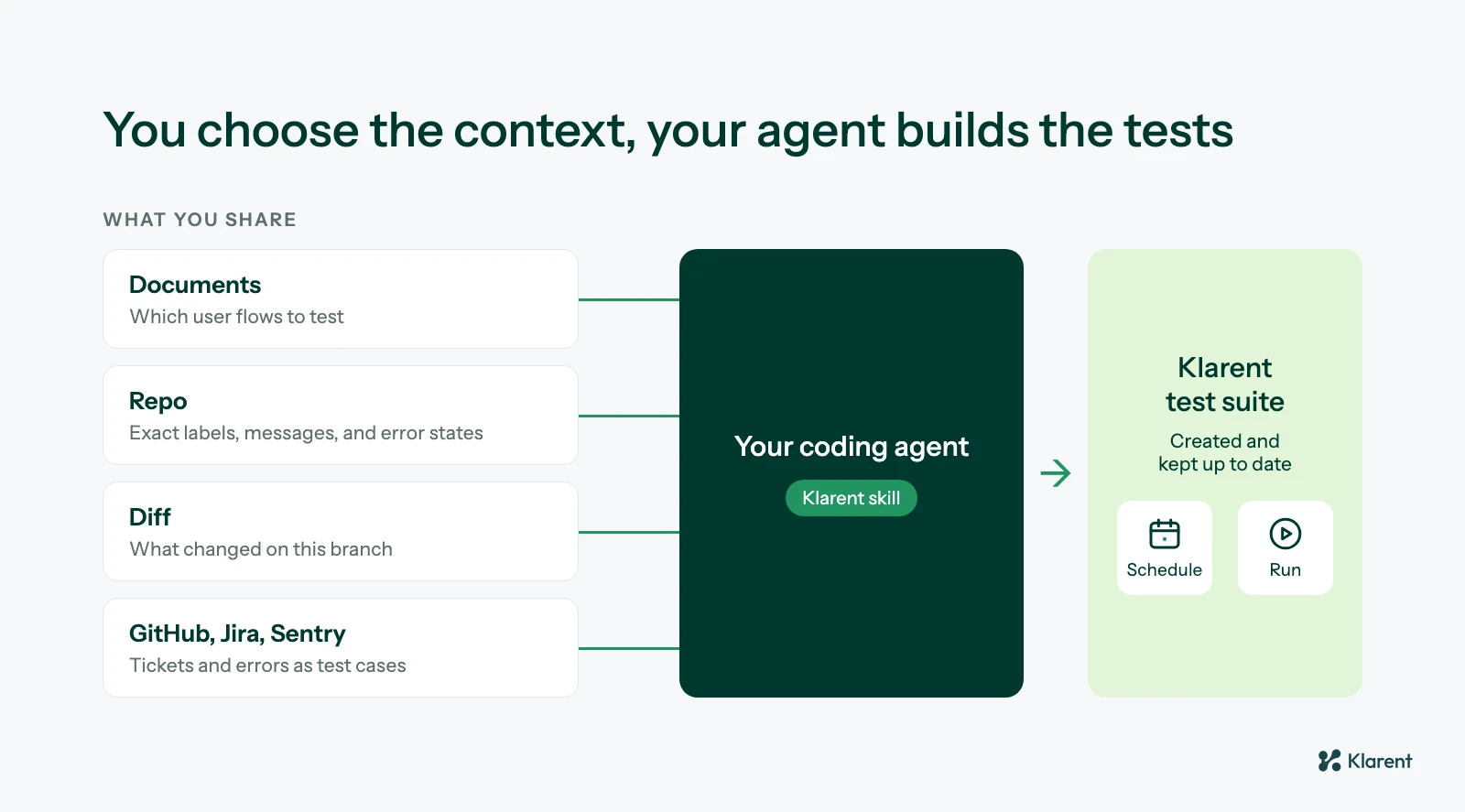 You decide which sources your agent can use, and each one makes the tests it builds more accurate.
Go from zero tests to full journey coverage
This is where the math changes. The cold-start problem is brutal and familiar: a working app, no tests, and a backlog that never justifies the time needed to write them. Writing those first tests is pure grind, and grind is what an agent is built for.
Start with a basic prompt:
We have no test coverage. Read the PRDs in /docs/product and the onboarding guide in /docs/help. Work out the main end-to-end user flows they describe. Give me the fifteen most important ones, ranked by how bad it would be if each broke. Don’t create anything yet, just the list.
What comes back are journeys like these: sign up and reach a first useful moment, hit the free-tier limit and upgrade, invite a teammate and have them accept, cancel and confirm access ends. Then you point the agent at your repo, where the code lives:
Create the top ten as Klarent test cases in suite
<TEST_SUITE_NAME>. Put credentials in variables, and give every case a verify line.
That is the whole trick, and it is a clean division of labour. The documents decide what to test, and the code supplies the vocabulary to write it in. In one sitting, a project with zero coverage has a ranked, real suite grounded in what users actually do.
Here is the same idea with a single PRD. The agent reads the document, maps its requirements to user flows, and creates a test case for each one:
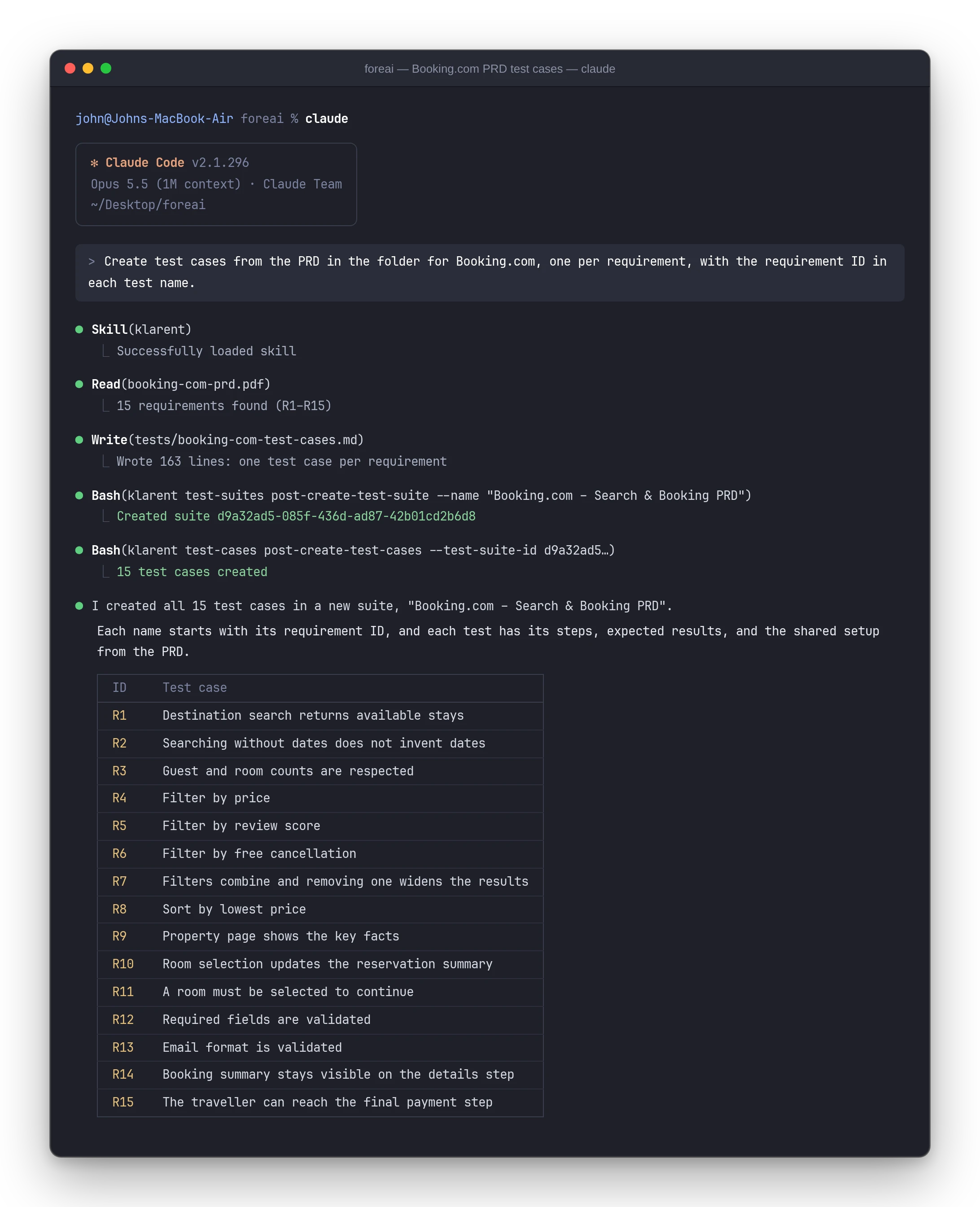
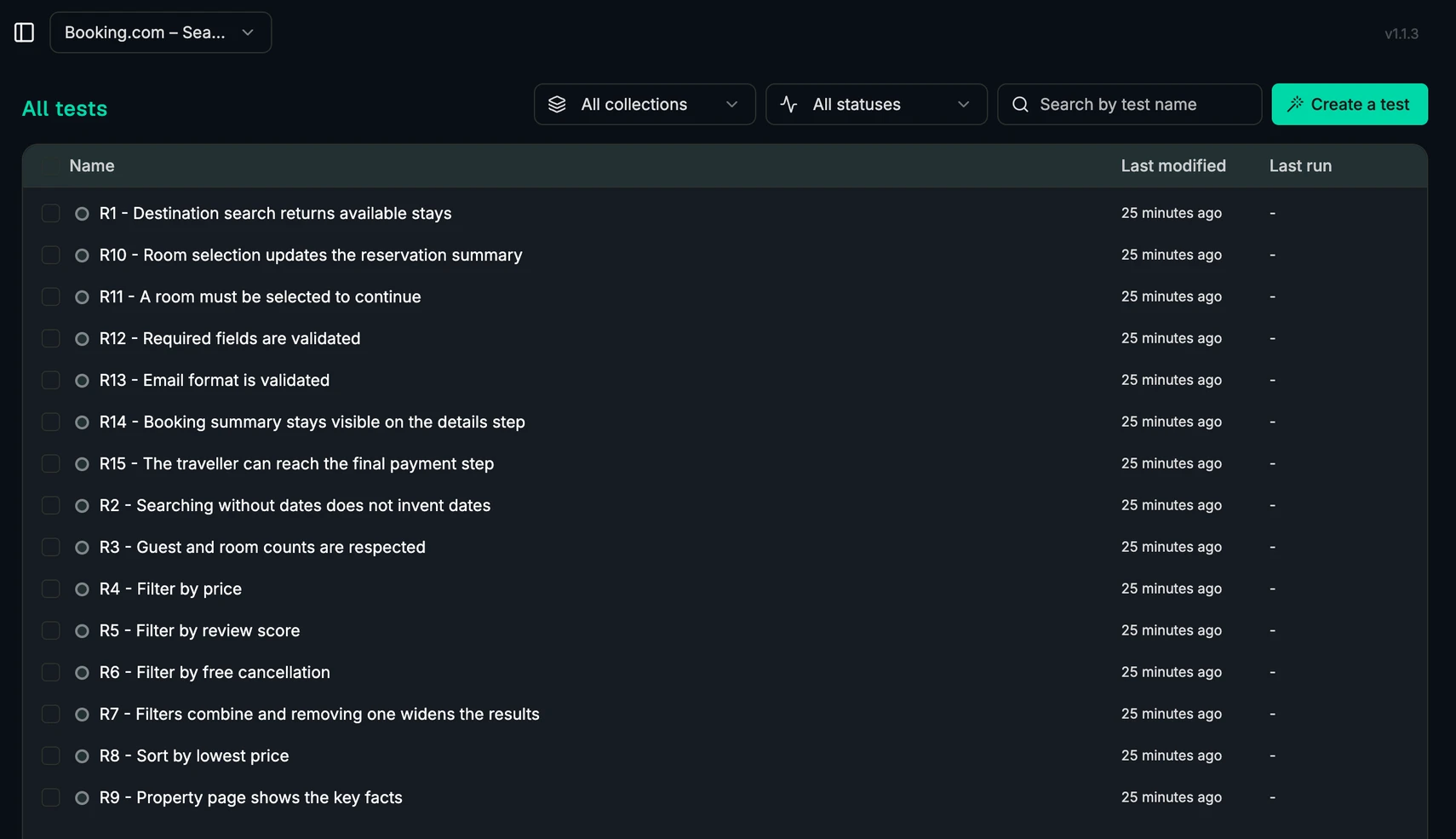
The new tests show up in Klarent straight away, each named after the requirement it covers:
Three more things to try
Once the suite exists, the same setup earns its keep in other ways.
Surface the flows you are missing
Only your documents can tell you what you were supposed to be testing. Try a read-only prompt:
Read the PRDs in /docs/product and last month’s support conversations. List the user flows they describe and compare them against my Klarent suite
<TEST_SUITE_NAME>. Which flows have no coverage? Rank by blast radius. Read-only, don’t create anything.
A route-level report might say /settings/billing has no test, which is true and not very useful. A flow-level report says nobody has ever tested a customer downgrading from Team to Free with an outstanding invoice. That is so close to a test description that writing it is the easy part. Nothing is changed, so this is the safe first command to run against any existing suite.
Turn multiple tickets into tests in one command
Every bug your team has fixed was a missing test. Teams say “we should add a test for that” after a bug, and almost nobody does. But a good bug ticket already contains everything a test needs: a precondition, a list of steps, and an expected result. It is a test written in prose, so there is no reason to convert tickets one at a time.
Take every ticket on the Jira board labelled regression from the last sprint and write a Klarent test case reproducing each. Put the ticket key in each test name so I can trace it back.
Point it at a label, a sprint, or a whole board, and a graveyard of “we should really cover that” becomes live regression coverage in a single prompt. Each case traces back to the exact bug that motivated it, and every future bug is one sentence away from becoming a permanent test.
Heal broken tests as you ship
Finally, the suite maintains itself while you work. This builds on the same idea behind self-healing tests, but it happens at the moment you change the code.
Look at what changed in this branch versus main. If anything a user can see changed, update the Klarent cases that cover it: patch existing ones, and create new cases only if the surface is genuinely new. Tell me first if you think nothing needs to change.
Most PRs need no test changes. When something does change, say a button renamed from “Send invite” to “Invite member,” the kind of three-line JSX edit no reviewer flags, the agent catches it in the diff and patches every affected case in the same PR. The test heals alongside the change that would have broken it.
How to write prompts that produce good tests
The agent is only as precise as what you ask it for. A few habits make the difference between a suite you trust and one you end up rewriting.
- Name the source. “Read the PRDs in /docs/product” beats “look at the docs.” The agent can only ground a test in something it has actually read, so point it at the exact files, folders, or tickets.
- Ask for a list before you ask for tests. A read-only first pass lets you check that the agent understood your product before anything is created. Reordering a list costs nothing. Deleting ten wrong tests does not.
- One behaviour per test, with a traceable name. Ask for one test per requirement, flow, or ticket, and put its ID in the test name. When something fails later, you know exactly which promise to the user just broke.
- Say what not to do. Limits belong in the prompt: stop before payment, never use real personal data, don’t touch the existing suite. The agent follows the boundaries you set, so set them out loud.
- Check behaviour, not values. “Results are sorted by price” survives a price change. “The first hotel costs €120” breaks the next time anyone updates a listing. Ask for assertions about what the product does, not the data it happens to show today.
Here is how those habits combine in a single prompt:
Read the PRD in /docs/product/checkout.pdf. Create one test case per requirement in a new suite called “Checkout PRD”, with the requirement ID at the start of each test name. Stop every test before the final payment step and use made-up test data only. Assert behaviour, not specific prices or product names.
Where it fits, and where it does not
An agent that writes tests is a big shift, but it is not magic. It helps to be clear about what it replaces and what it does not.
- It sits alongside your code-level tests, not in place of them. Unit and integration tests in your repo still catch logic bugs fastest and cheapest. Klarent covers what sits above them: whether a user can actually get through a journey end to end. If you are weighing the two approaches, this comparison of AI testing platforms and traditional automation covers where each one makes sense.
- The context you give it sets the ceiling. With no documents, tickets, or code to read, the agent can only guess at generic checks like “login works.” The more specific the material you point it at, the more specific and useful the suite becomes.
- A person still reviews the output. The agent drafts and you decide. Read the list before anything is created, and skim the cases afterwards. That takes minutes rather than the days it used to take to write them, but it is not a step to skip.
- Live products move. Prices change, listings come and go, and pop-ups appear without warning. Tests that assert behaviour and keep test data in variables hold up. Tests that check today’s exact values break the next time someone updates the page.
Give it a try
Full coverage was never unrealistic. It was just too expensive to reach and too expensive to keep. Klarent CLI changes both halves of that. Describe a journey in English and you get a test. Point your agent at your docs, your tickets, and your diffs, and you get a suite that reflects what your product actually does and stays that way as you ship.
It takes a minute to install, your first prompt can be read-only, and it will show you how much of that dream is suddenly within reach.