Autonomous testing tools: Evaluating the next generation of QA platforms

Published on
“Autonomous testing” shows up on nearly every QA vendor’s homepage right now. Used this loosely, the word stops meaning much. Autonomy is a spectrum, not a checkbox, and two tools can both claim it while behaving nothing alike once an application changes. For a fuller introduction to the underlying concept, see what is autonomous testing; this post focuses on how to evaluate a tool’s autonomy claims before adopting one.
What makes a testing tool “autonomous”?
The clearest dividing line is whether the tool decides what to do next on its own. A tool sitting at the assistive end of the spectrum still needs a person to choose what to test, write the scenario, and decide how to respond when something breaks, with AI speeding up pieces of that work. A tool at the independent end discovers scenarios itself, adapts when the application changes, and handles a meaningful share of maintenance without waiting for a person to intervene.
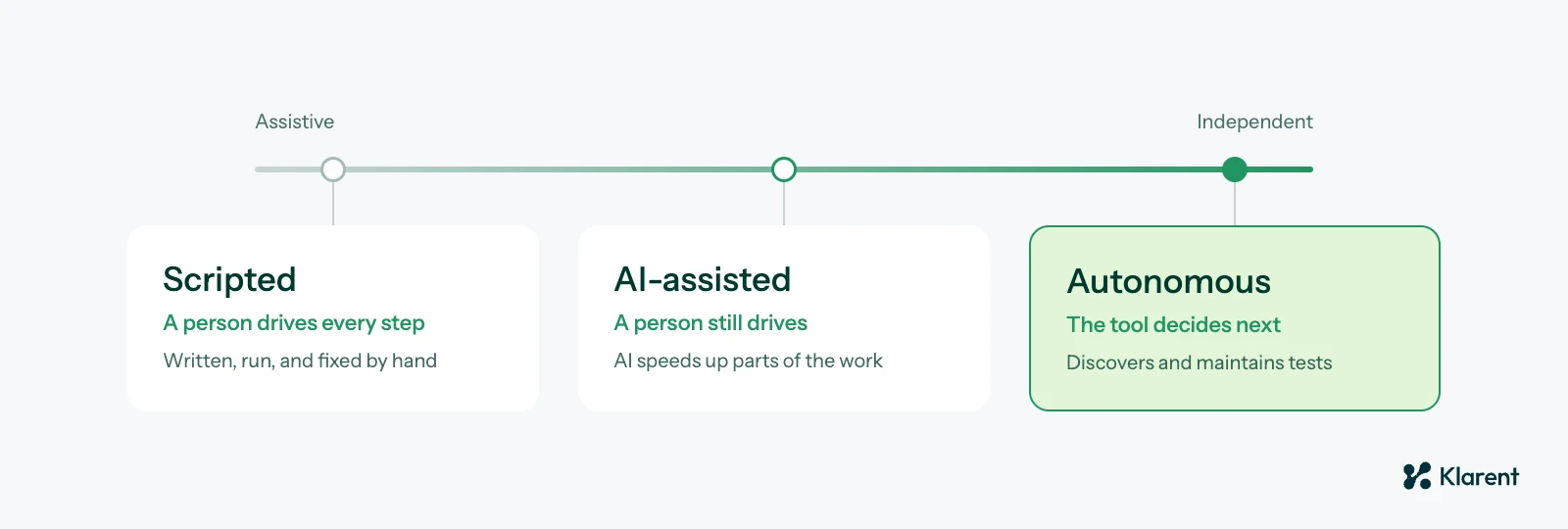 Autonomy is a spectrum: what matters is whether the tool decides what to do next on its own.
Most tools marketed as “autonomous” sit somewhere in the middle of that spectrum rather than at either end, which is why evaluating the specific capabilities underneath the label matters more than the label itself.
Core capabilities to evaluate
A useful evaluation breaks “autonomous” down into distinct capabilities rather than treating it as one property:
- Test discovery. Does the tool identify what needs testing on its own, from a spec, a ticket, or the application itself, or does a person have to define every scenario manually?
- Test generation and execution. Can it turn a discovered scenario into a working, runnable test without hand-written scripts, and run that test without manual triggering?
- Self-healing and maintenance. When the UI or workflow changes, does the tool adapt the affected test automatically, or does it fail and wait for someone to fix it?
- Triage and reporting. When something does break, does the tool explain what changed and why clearly enough that a person can act on it quickly, or does it hand back a raw failure with no context?
A tool can be strong in one of these areas and weak in another, which is why a single “autonomous” label tends to hide more than it reveals.
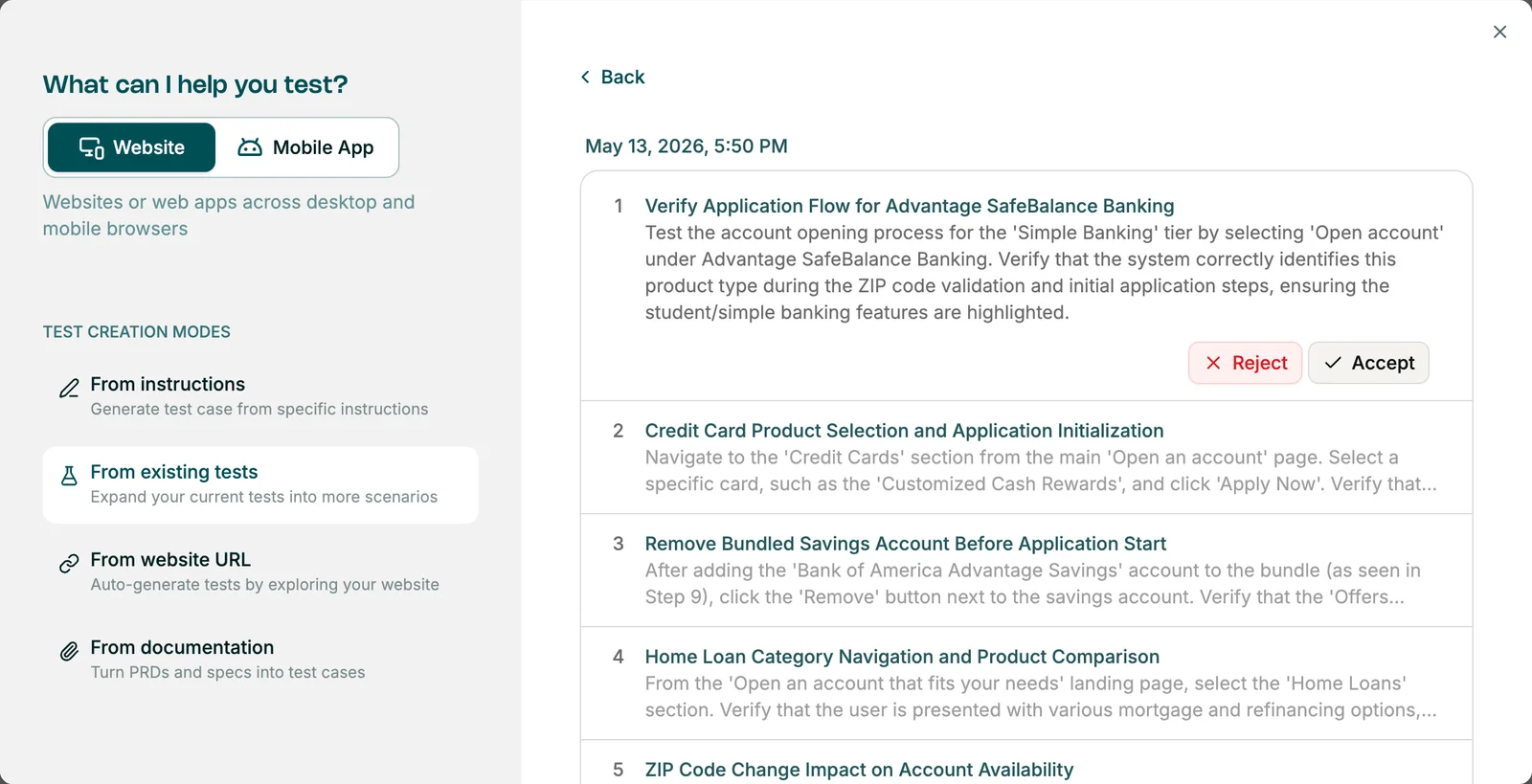 Discovery in practice: Klarent explores a website, suggests test scenarios, and a person accepts or rejects each one.
Platform architecture: Single-model wrappers vs. multi-agent systems
Underneath the marketing, autonomous testing platforms tend to fall into two architectural categories. A single-model wrapper sends a prompt to one large language model and uses whatever comes back, which can work for simple, narrow tasks but tends to struggle as a workflow gets longer and more steps compound against each other.
A multi-agent system splits the problem into specialized roles instead: one agent discovers what to test, one plans the approach, one writes the executable steps, one verifies the work, one runs the tests, and one reports the results. Klarent’s architecture follows this model. Explorer maps the relevant flows, Planner designs the test, Coder writes it, Verifier checks both the plan and the code, Runner executes the suite, and Notifier sends the results to the team.
That division of labor matters because a multi-step testing workflow (discover, plan, build, run, report) compounds reliability requirements at every step, and a system built around specialized roles tends to hold up better across that whole chain than a single general-purpose call being asked to do all of it at once.
How Klarent approaches autonomous testing
Klarent’s self-healing repairs a test when steps fail because elements, IDs, or locators changed in the application. From a failed run, the team chooses to heal the test, Klarent rebuilds the affected steps against the latest version of the application, and it shows what changed so a person can accept or reject the fix. Combined with plain-language, no-code test creation, that means a team can describe what they want tested once and keep that coverage current as the application evolves, without someone hand-scripting every fix.
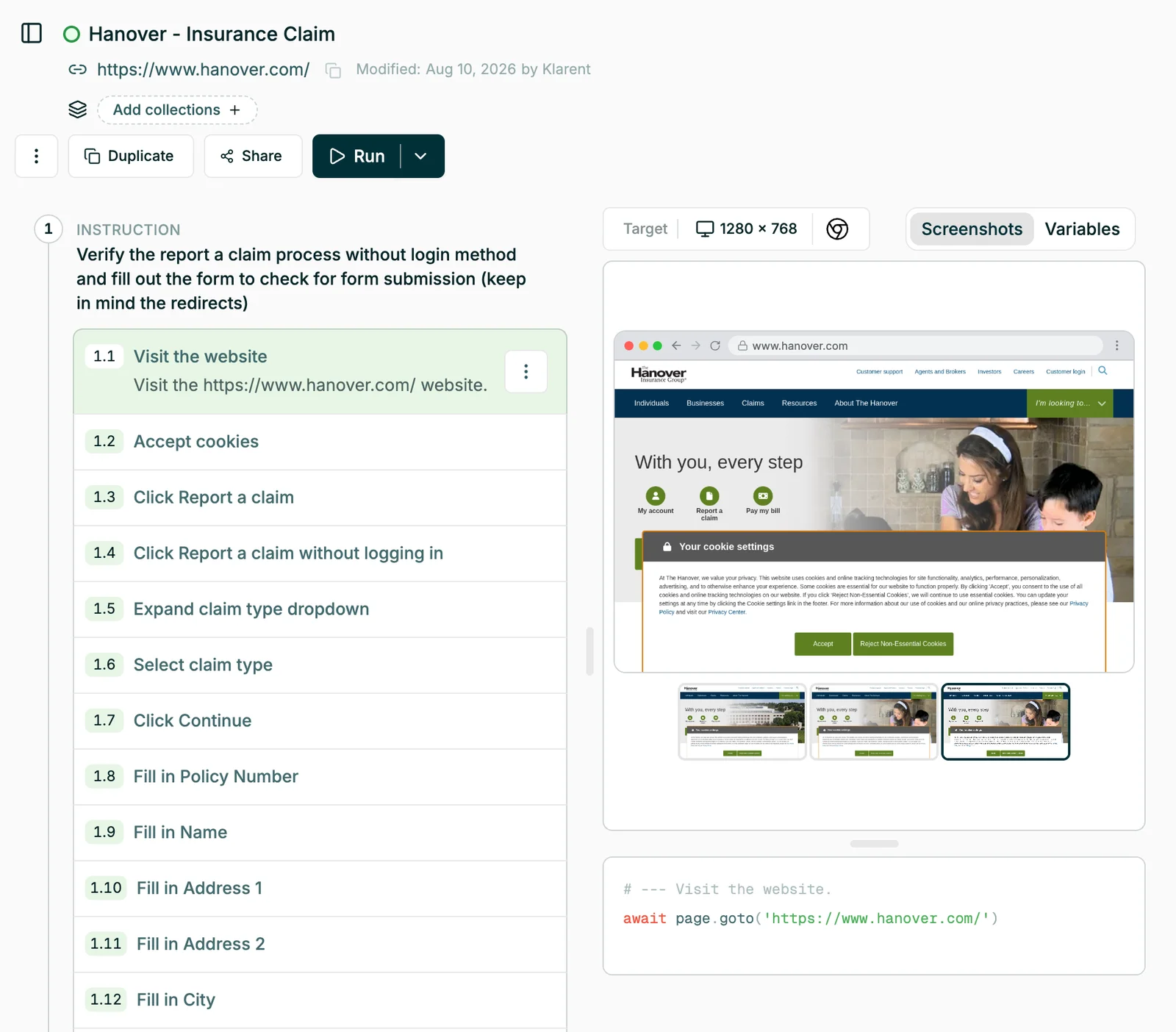 One plain-language instruction becomes named steps, each with a screenshot and generated code.
For visual changes, that adaptation is confidence-gated: high-confidence intentional changes update the baseline automatically, while anything less certain goes to a person for confirmation first, so a real regression never quietly becomes the new expected state. If you’re weighing Klarent against a specific tool, the comparison pages go through each one side by side.
Questions to ask when evaluating autonomous testing platforms
A short, direct list of questions tends to cut through vendor claims faster than a feature checklist:
- Does it discover test scenarios on its own, or only execute what a person has already defined?
- What happens when the application changes? Does the test adapt, or simply fail?
- When it changes a test or baseline on its own, how does it decide what’s safe to change automatically, and can you see what it changed?
- Does it integrate with the CI/CD, ticketing, and collaboration tools the team already uses, or does it require a separate process?
- How transparent is it about what changed and why, when something does break?
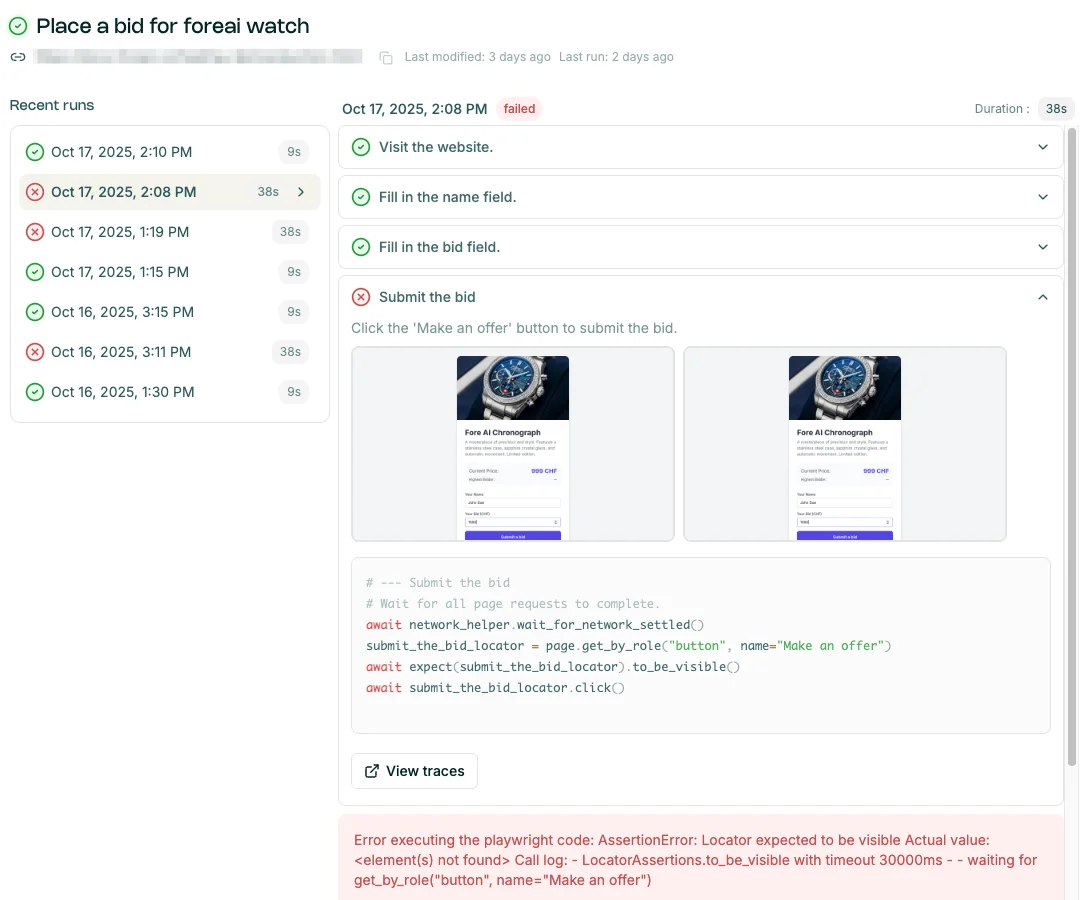 A failed run should show which step broke and why, with screenshots, code, traces and the error message.
Common pitfalls when adopting autonomous testing tools
A few common mistakes can make the first few months with an autonomous testing platform harder than they need to be:
- Assuming zero human oversight is needed. Even a highly autonomous tool still benefits from a person reviewing strategy, coverage decisions, and edge cases that need judgment.
- Underestimating migration effort. Moving off a large scripted suite takes real time, and treating it as an overnight swap tends to create gaps rather than closing them.
- Choosing a tool based on demo scenarios. A demo flow is built to succeed. The only real test is how the platform performs against a team’s actual application, including its messiest and least-used corners.
The future of autonomous testing
The broader shift underway is from AI-assisted point tools (narrow features bolted onto an existing process) toward full-lifecycle QA platforms that handle discovery, generation, execution, maintenance, and reporting as one connected system. Natural language input is becoming the expected default rather than a bonus feature, and human oversight is shifting toward strategy, compliance, and the edge cases that still need a person’s judgment, rather than the repetitive mechanics of keeping a suite running.
The label “autonomous testing tool” will likely keep getting applied loosely for a while yet. The capabilities underneath it (discovery, generation, self-healing, and transparent reporting) are what decide whether a platform holds up once it meets a real application instead of a demo.