Platform · Test Management
AI test case generation
Hand Klarent a user story, a requirement document or a design file, and get a reviewed set of test cases back in minutes instead of days.
Why test case writing falls behind
Where manual test case writing runs out of time
Coverage capped by typing speed
Test coverage is limited by how fast people can write cases, not by what actually needs testing.
Requirements outrun the cases
Requirements change faster than the cases written against them, so the suite describes last quarter’s product.
Edge cases get skipped
The happy path takes the whole sprint, so edge cases and negative paths are the first thing dropped.
A repository that drifts
Different testers write to different standards, so the case repository slowly stops looking like one team wrote it.
Every feature starts from a blank page
Each new feature begins with an empty template, so test design waits until someone has time to write the first case.
Context leaves with the author
A case often makes sense only to the tester who wrote it, so when they move on, the reasoning behind it goes too.
How it works
How automated test case generation works in Klarent
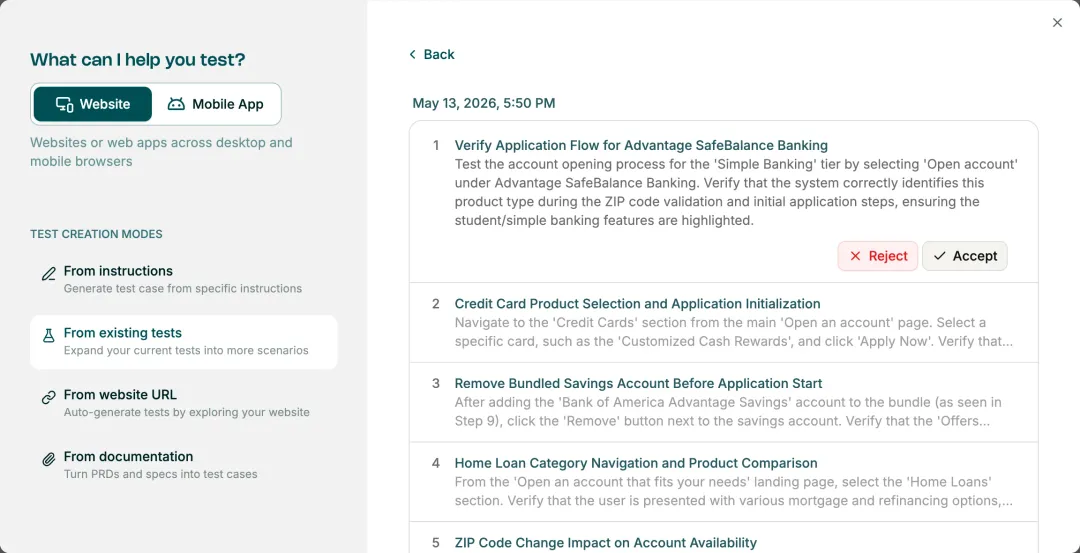
Klarent drafts the cases your team would otherwise write by hand, with numbered steps, expected results, priority and where each case belongs. Your testers keep the decision: nothing is saved to the repository until one of them approves it.
Step 1 - Input
Point Klarent at the source of truth for the feature: a user story, a requirement document or a design file.
Step 2 - Generate
Cases are drafted with steps, expected results and priority, ready to read like any case your team wrote.
Step 3 - Review
A tester edits, approves or rejects each case before anything is saved to the repository.
What you can generate from
Generate test cases from the inputs you already have
You do not need to rewrite your documentation for the tool. Use whatever already describes how the feature should behave, including its acceptance criteria.
A plain-English description
A written prompt describing the feature or the flow you want covered.
A user story or ticket
A user story or ticket in your tracker, with its acceptance criteria, turned into cases.
A requirement document
A requirement or product specification document, read end to end.
A design file or screenshot
A design file or a screenshot of the interface, so cases match what users will see.
An existing spreadsheet
A spreadsheet of cases you already have, to expand or restructure.
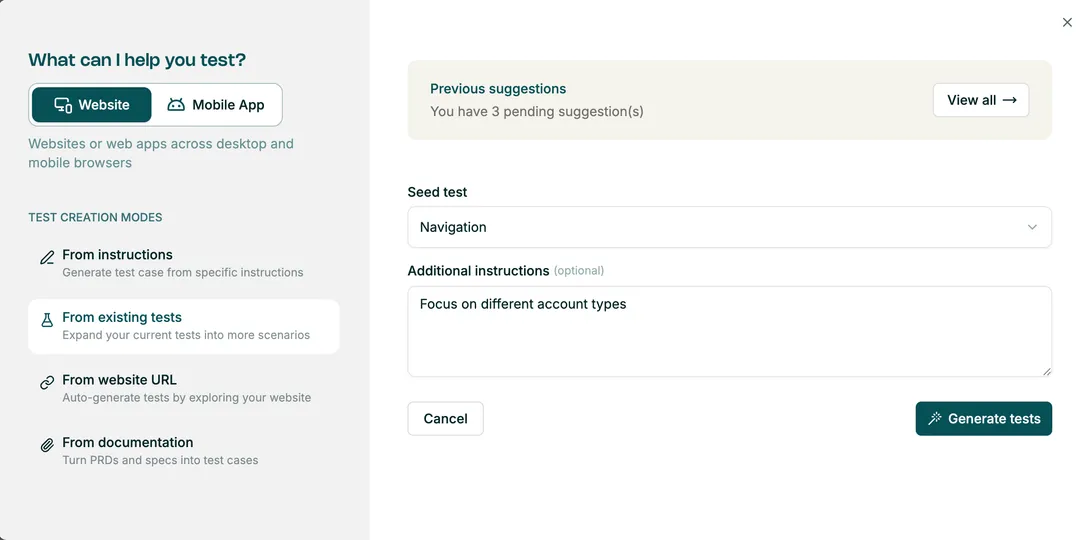
What the generated cases contain
AI generated test cases a tester can follow
Steps and expected results
Numbered steps and expected results a tester can follow without guessing.
Negative paths and edge cases
Negative paths and edge cases sit alongside the main flow, not in a backlog for later.
Priority and placement
Each case carries a priority and a suggested folder or suite for it to live in.
A link back to the requirement
Every case links back to the requirement it came from, so you can see why it exists.
Your own case template
Formatting stays consistent against your own test case template, whoever pressed generate.
Keeping quality control
Generated, then reviewed. Never the other way round.
Nothing enters without approval
Nothing enters the repository until a person has reviewed and approved it.
Duplicate detection
Duplicates are flagged so generation does not bloat the repository with near-copies.
Editing and version history
Every generated case can be edited, and every change is kept in its version history.
Klarent vs. traditional QA
Manual test case writing vs AI test case generation
| Manual test case writing | Klarent AI test case generation | |
|---|---|---|
| Time to a full set of cases | Days, written one case at a time | Minutes, drafted from the requirement |
| Negative paths and edge cases | The first thing dropped when the sprint runs short | Drafted alongside the main flow |
| Consistency | Varies with whoever wrote the case | Formatted against your own test case template |
| Link to the requirement | Only if someone adds it by hand | Every case links back to the requirement it came from |
| Duplicates | Near-copies build up in the repository | Flagged as cases are generated |
| Review | Depends on your team process | A tester approves every case before it is saved |
Generate cases from one of your own user stories.
Bring a real user story or requirement document, and see the test cases Klarent drafts for your team to review.
Related platform pages
FAQs
You point Klarent at a source of truth for the feature, such as a user story, a requirement document or a design file. It drafts test cases with numbered steps, expected results and priority, then holds them for a tester to review. Nothing is saved to the repository until it is approved.
A written prompt or plain-English description, a user story or ticket in your tracker, a requirement or product specification document, a design file or screenshot of the interface, or an existing spreadsheet of cases you want expanded or restructured.
They are a first draft built from the material you provide, so they are only as good as the requirement behind them. That is why every case is reviewed before it is used. A clear user story with acceptance criteria gives a tighter draft than a one-line description.
Yes. A tester edits, approves or rejects each case, and nothing enters your repository without approval. Generation speeds up the writing. It does not remove the person who is accountable for quality.
Yes. Every generated case can be edited like one a person wrote, and version history keeps a record of each change.
Yes. Generated cases are formatted against your own test case template, so they look the same as the ones your team already wrote.
Yes. Negative paths and edge cases are drafted alongside the main flow, so they are reviewed in the same pass instead of being left for a later sprint.
Klarent runs duplicate detection as cases are generated, so near-copies of cases you already have do not bloat the repository.
Yes. Once a case is approved it can be turned into an executable test. See AI-powered test creation for how that works.